The Google 3-Pack: What It Is and How Businesses Get In
The Google 3-Pack is the three local businesses Maps shows first. What decides who appears, why your position changes street by street, and how to improve it.

What the Google 3-Pack Is
-
The Google 3-Pack — also called the Map Pack or local 3-pack — is the box of three businesses Google shows above the ordinary results on a local search. It captures the customer at the moment of choosing, which is why appearing in it is the prize in local SEO
-
Google ranks the pack on three factors — relevance, distance, and prominence — and improving your ranking is mostly about strengthening the two you control: relevance and prominence
-
Your Google Business Profile is what ranks, not your website — so optimising the profile is the highest-leverage work you can do
-
Reviews and photos are ranking work, not just reputation work — they feed prominence and they win the customer
-
You don't have one ranking — you have a different one in every part of your area, because distance is measured from the searcher
-
So the honest measure of "how am I ranking?" is a map, not a number — a GeoGrid heatmap of where you're visible across your whole catchment
Ranking in the Google Map Pack is the single highest-value thing a local business can do in search — and it's also one of the most misunderstood. This is the complete picture: what the pack is and why it matters, the three things Google actually ranks you on, how to genuinely improve your position, and the part almost everyone gets wrong — that your ranking isn't one number you can climb, but a map that's different in every neighbourhood you serve. Each section points you to a deeper guide on its own piece, but read end to end, this is the whole worldview in one place.
What the Map Pack Is and Why It's the Prize
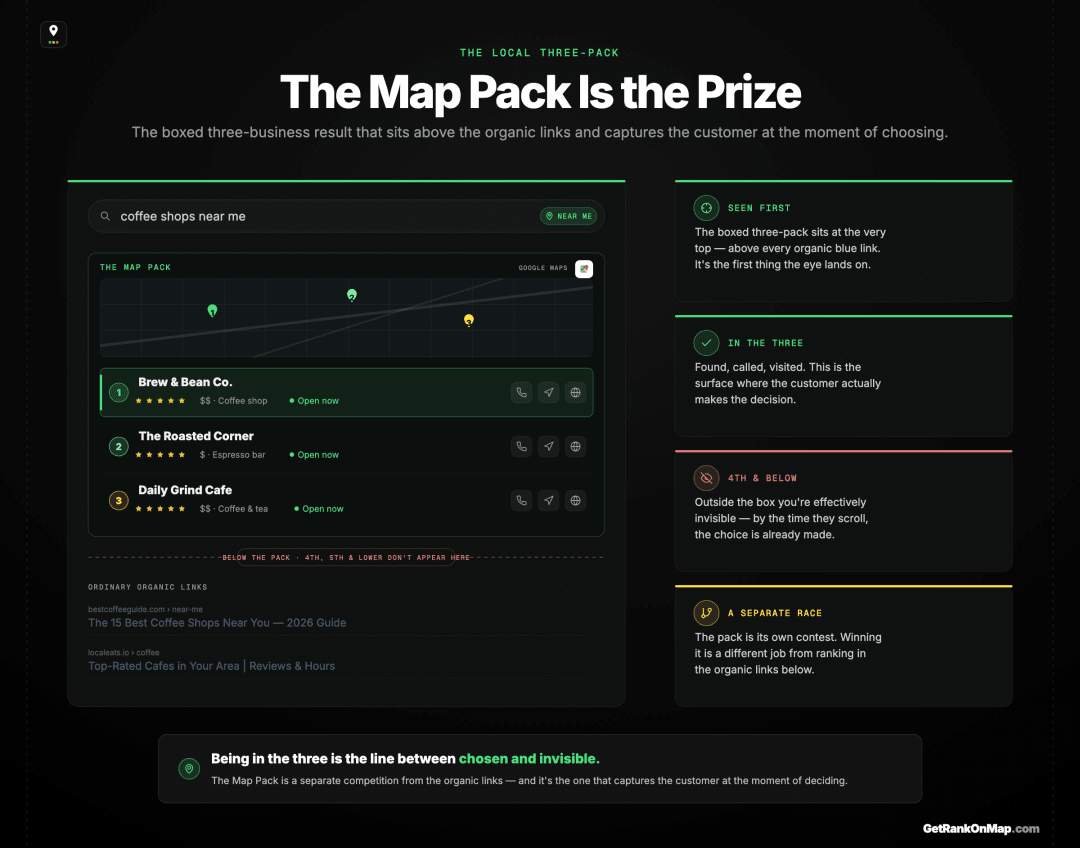
The Map Pack — or local three-pack — is the boxed set of three businesses, with a map, that Google shows at the top of a local search. It sits above the ordinary blue links and captures the customer at the exact moment they're deciding. For a local business, being in it is the difference between being chosen and being invisible.
When someone searches for something local — "dentist near me," "coffee [town]," "emergency plumber" — Google shows a small map with three businesses pinned to it, their ratings, hours, and tap-to-call or directions buttons. That's the Map Pack, and it sits above the regular organic links. It's built for the local, ready-to-act moment, and it's where most local decisions are made.
That's why ranking in it is the prize. Which three businesses Google puts in the box is a separate question from your Maps rank — one business averaged 2.8 in the pack and 8.19 in Maps for the same keyword. A business in the local three gets found, called, and visited; a business in fourth or fifth is effectively invisible at the instant the customer chooses, however good it is. And it's a separate competition from the rest of search: ranking on the organic blue links, or showing up in regular Google search, doesn't win you the pack — it has its own rules, which the rest of this guide is about.
The Three Things Google Ranks You On
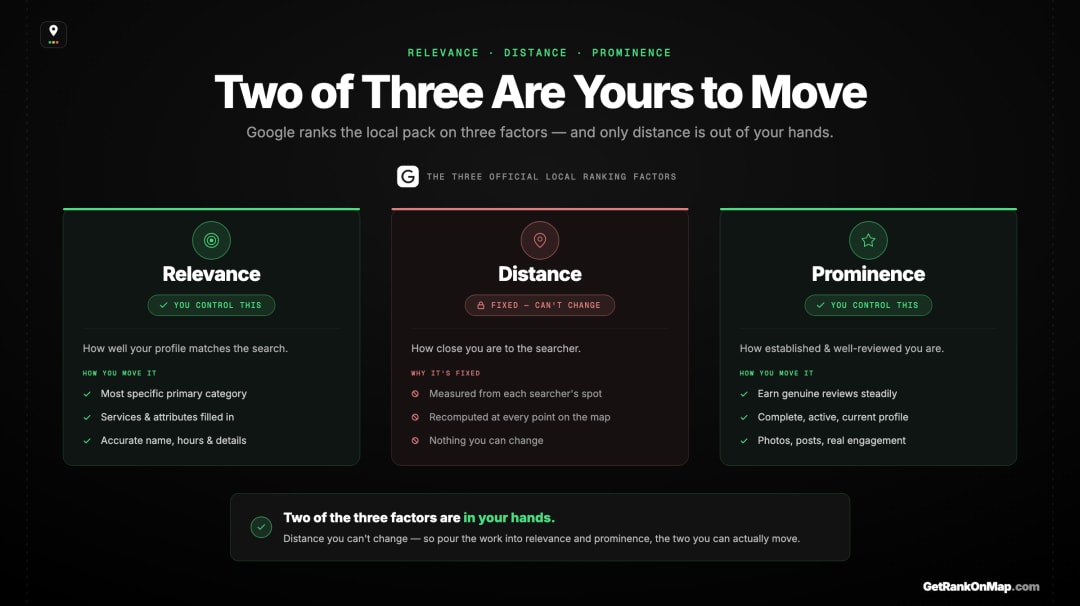
Google is open that local ranking comes down to three factors: relevance (how well you match the search), distance (how close you are to the searcher), and prominence (how established and well-reviewed you are). Almost everything you can do to rank better is a way of strengthening relevance or prominence — because distance, you can't change.
Google states the three local ranking factors plainly: relevance, distance, and prominence.
- Relevance is how well your profile matches what someone searched. You strengthen it by telling Google specifically what you are and do — the right primary category, your services, accurate details.
- Distance is how close you are to the person searching. You can't change your location, so this is the factor you work around rather than improve.
- Prominence is how well-known and well-regarded you are — built heavily on reviews, but also on how complete and active your presence is.
The full breakdown of how these factors work is here. The useful takeaway for ranking is simple: two of the three are in your hands. Pour your effort into relevance and prominence, and stop fighting distance — because, as we'll see, distance is exactly why your ranking will never be a single number.
How to Actually Improve Your Ranking
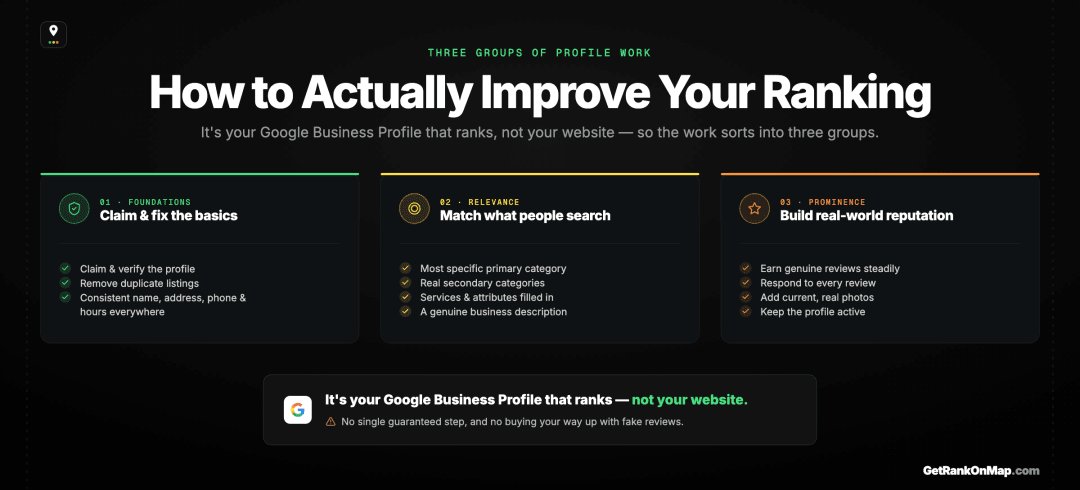
Improving your Map Pack ranking is concrete work on your Google Business Profile: get it verified and complete, choose specific categories, fill in services and attributes, and steadily earn genuine reviews and fresh photos. It's the profile that ranks, not your website — so this is where the leverage is.
The good news is that the work is well-defined. Because it's your Google Business Profile that ranks in the pack, optimising that profile is the highest-leverage thing you can do. In short:
- Get the foundations right — claim and verify the profile, remove duplicates, and make your name, address, phone, and hours accurate and consistent everywhere.
- Strengthen relevance — pick the most specific primary category, add only the secondary categories you really offer, list your services and attributes, and write a genuine description.
- Build prominence — earn genuine reviews steadily, respond to them, keep adding strong current photos, and stay active.
Each of those is a checklist item, and the full, ordered version — grouped by exactly these factors — is in the Google Business Profile optimisation checklist. Reviews in particular pull double duty: they feed your prominence ranking and they're what a customer judges you on in seconds. One honest caveat carries through all of it: there's no fixed exchange rate and no single step that guarantees the top — Google weighs the factors together, and you can't buy your way up with fake reviews. The work is real, but it's exactly the work that's rewarded.
Why "Ranking" Isn't One Number
Because Google measures distance from each searcher, your ranking is recalculated for every location — so you don't have one ranking, you have a different one in every part of your area. This is the single most important thing to understand about the Map Pack, and the reason most rank-tracking quietly misleads you.
Here's the idea that changes how you should think about all of this. Since distance is measured from the searcher, your ranking is different in every location. You might be in the top three for customers a mile north and nowhere a mile south, where a competitor is closer. That's not a glitch or a penalty — it's the distance factor working exactly as designed.
Which means the question "what's my Map Pack ranking?" has no single answer. Any tool — or any habit, like searching on your own phone — that hands you one number has picked one spot and called it the whole truth. That single number is misleading by design: it can flatter you with a strong result from your front door, or panic you with a weak one from across town, and neither tells you what's actually happening across the area you serve. It's also why so many owners think they've disappeared from Maps when they're really just looking from their weakest spot.
So if your ranking is a different answer everywhere, the only honest way to see it is everywhere at once.
Measure It as a Map, Not a Position
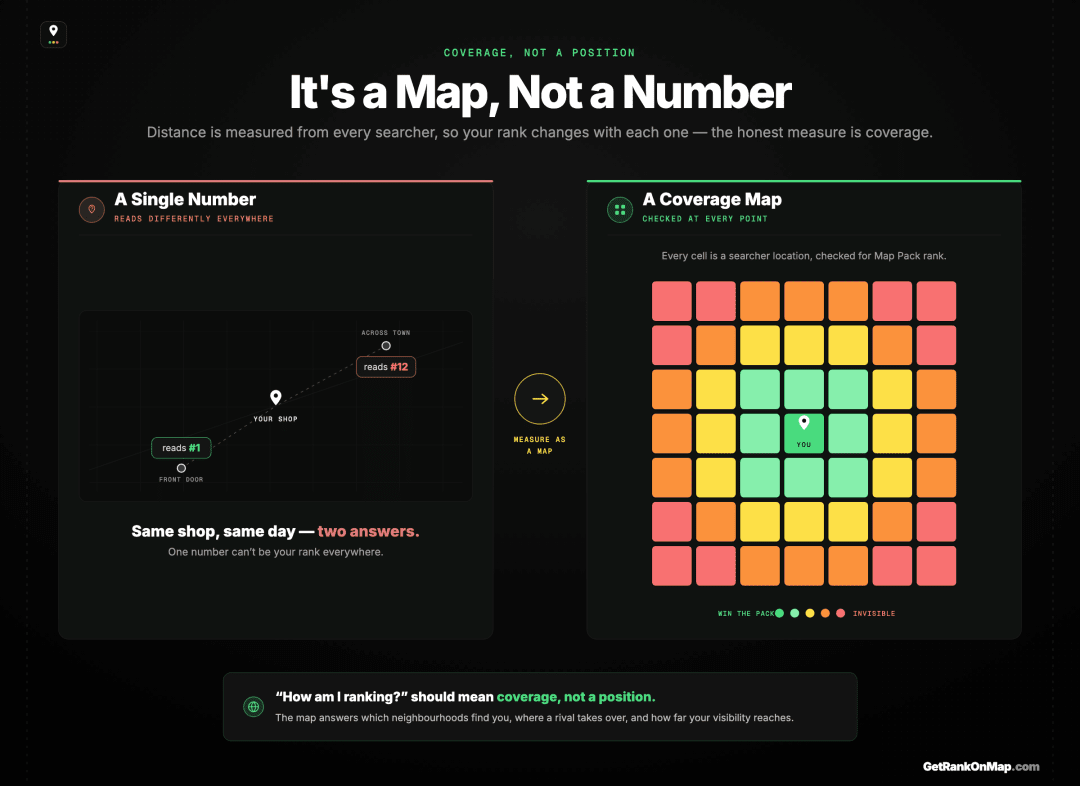
Because your ranking varies across space, the right unit of measurement is coverage — where, across your whole area, customers can find you in the pack. A GeoGrid checks your rank at a grid of points and draws the result as a green-to-red heatmap. That map is what "how am I ranking?" should actually mean.
If your real ranking is different at every location, then you measure it by checking at many locations and drawing the result as a map. That's a GeoGrid: a grid of points laid across your catchment, your Map Pack rank checked at each, and the whole thing rendered as a colour-coded heatmap — green where you're winning the pack, red where you've dropped out. Here's how a GeoGrid scan works.
That heatmap answers the real questions a single number can't: which neighbourhoods can find you, where a competitor is quietly taking your customers, how far your visibility reaches before it fades, and — run before and after — whether your optimisation actually worked. It closes the gap between "I think I rank okay" and knowing. If you just want the fastest way to get a first read today, here's how to check your Maps ranking for free.
That map is exactly what RankMap is built for: your Map Pack visibility tracked as real coverage across every neighbourhood you serve, the way local search actually behaves. RankMap isn't live yet — we're pre-launch. If ranking in the Map Pack matters to your business, join the waitlist for free early access and see your local visibility as the map it always was.
Three Factors, One Profile, Many Positions
Ranking in the Google Map Pack comes down to a few clear truths. The pack is where local customers decide, so it's the prize. Google ranks it on relevance, distance, and prominence — and you win by strengthening the two you control, mostly through a well-optimised Google Business Profile and genuine reviews. But the truth that reframes everything is that you don't have one ranking; you have a different one in every part of your area, because distance is measured from the searcher.
That's why the honest answer to "how am I ranking?" is never a number — it's a map of where, across your whole catchment, customers can actually find you. Build the profile, earn the reviews, and then measure the result as coverage, not a position. That's the map RankMap is built to give you. We're not live yet, but when we are, you'll see your Map Pack visibility the way it really works. Join the waitlist for free early access.
Go deeper
- Local SEO Audit: The Step Almost Every Checklist Skips
- Local Keyword Research: Volume Is the Wrong Metric
- How to Rank on Google Maps With No Budget
- Why Your Google Maps Ranking Matters More Than You Think
- Local SEO Ranking Tools: The Six Jobs a Stack Has to Cover
- Local SEO for Multiple Locations: Every Branch Ranks Alone
Frequently asked questions
- 01How do I get into the Google Map Pack?
- You earn a place in the local three-pack by being relevant, close, and prominent for the search. In practice: a verified, complete Google Business Profile with the most specific primary category, accurate and consistent details, real services and attributes, and a steady stream of genuine reviews and current photos. Distance you can't change, but relevance and prominence you can build, and those are what move you from just outside the pack to inside it. There's no single switch — it's the combined picture Google weighs.
- 02How long does it take to rank in the Map Pack?
- There's no fixed timeline. Some changes — fixing a category, completing a profile — can register relatively soon, while prominence built on reviews and activity is a slower burn. A brand-new profile usually needs time to establish itself before it competes for busier searches. Rather than guess, measure your visibility across your area before and after your work, so you can see what's moving and when instead of refreshing a single search and hoping.
- 03Why do I rank in the pack in some areas and not others?
- Because Google measures distance from each searcher, your ranking is recalculated for every location and naturally changes across your area — strongest near you, fading further out where a competitor is closer. It isn't a mistake or a penalty; it's the distance factor working as designed. This is why your ranking can't be captured by a single number and has to be read as a map of your coverage across the whole area you serve.
- 04Is the Map Pack the same as ranking on Google?
- No — they're separate competitions. The Map Pack is the local three-business result with a map, ranked on relevance, distance, and prominence via your Google Business Profile. Ordinary organic ranking is the blue links below, ranked on different signals via your website. Doing well in one doesn't guarantee the other, so for local "near me" searches specifically, the pack is usually the higher-value position and the one this guide focuses on.
- 05What's the best way to track my Map Pack ranking?
- As a map, not a single number. Because your ranking varies by the searcher's location, the honest measure is coverage — a grid of points checked across your area and drawn as a heatmap, so you can see where you're visible and where you're not. Searching for yourself from one spot, or trusting a tool that reports one figure, gives you a single biased data point. A GeoGrid heatmap shows the whole picture and lets you see change over time and across neighbourhoods.
Explore with AI
Share this
Map your real rank across the city.
Free for the first 50 scans. No credit card.
Join the waitlist

