Why Is My Business Not Showing on Google Maps?
Can't find your business on Google Maps? The real reasons — unverified or suspended profiles, thin info, and the trap where you show to customers but not you.

Two Very Different Problems
-
"Not showing on Google Maps" usually has a fixable cause — an unverified or suspended profile, missing information, a duplicate listing, or simply a profile too new to have built up prominence yet
-
The most common reason isn't that you're invisible — it's that you're invisible to you — because Maps ranking changes with the searcher's location, you can be showing to customers across town while you're nowhere in your own searches
-
Google ranks local businesses on three factors — relevance, distance, and prominence — so a profile that's incomplete (relevance) or new and little-reviewed (prominence) can genuinely struggle to appear
-
Searching for your own business is the worst way to check — Google personalises results by your location, your account, and your history, so what you see is not what a customer sees
-
A suspended or unverified profile won't appear at all — those are separate problems from ranking, and they have their own fixes through Google Business Profile
-
The only honest way to know if you're really missing — or just missing from your spot — is to check across a map, not from one location; that's the gap a GeoGrid closes
You search your own business name, or "[your service] near me," and you're not there. It's a horrible feeling — it looks like you've vanished, like every customer is seeing the same blank where you should be. Most of the time, it isn't that bad, and the cause is something specific and fixable. But there's a catch that traps almost everyone who panics over this: the way you're checking is the least reliable way there is. This guide walks through the real reasons a business doesn't show on Google Maps, sorts the "you're genuinely not on the map" causes from the far more common "you're on the map, just not where you're standing" ones, and explains how to actually tell which is which.
First, Two Very Different Problems
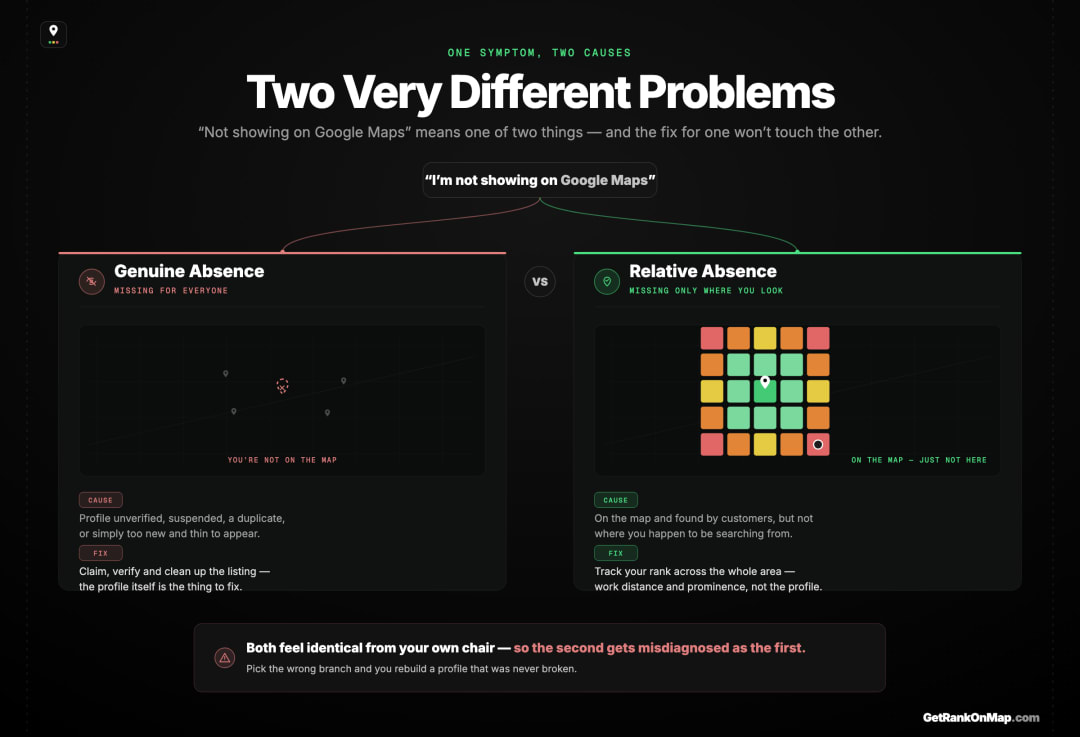
"Not showing on Google Maps" splits into two completely different situations: either your business genuinely isn't appearing for anyone (a profile problem), or it's appearing for customers but not in your own searches (a ranking-and-location problem). They have different causes and different fixes, and confusing them is the single biggest reason owners chase the wrong solution.
Before touching a single setting, it's worth knowing which problem you actually have, because they're not the same thing at all.
The first is genuine absence: your profile isn't verified, it's been suspended, it's a duplicate that Google has merged or hidden, or it's brand new and hasn't established itself yet. In these cases the business really is missing — for you and for everyone.
The second, and far more common, is relative absence: your business is on the map and showing to plenty of real customers, but it doesn't appear where you happen to be searching from. This feels identical from your chair — you can't find yourself, so you assume you're gone — but it's a completely different situation with a completely different cause. You're not missing; you're just not winning the search at your location.
Most owners who panic about "not showing" are in the second camp and treat it like the first — rebuilding a profile that was never broken. So the first move is always to figure out which one you're in. The sections below cover both.
The Real Reasons You're Genuinely Not on the Map
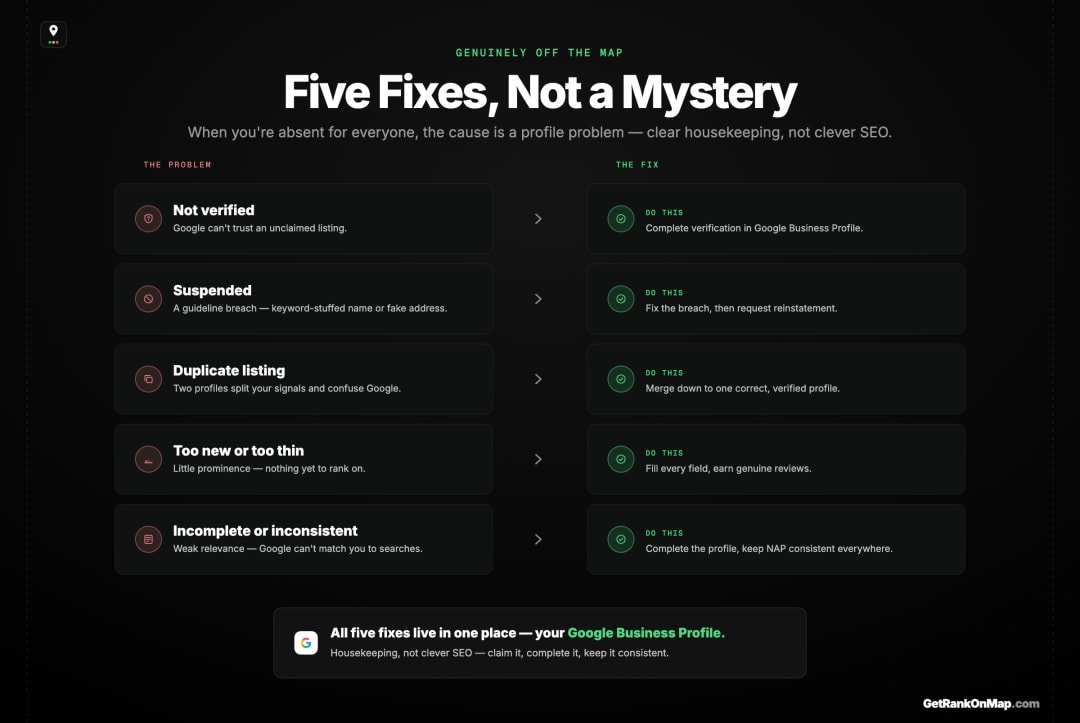
If your business truly isn't appearing for anyone, the usual culprits are a handful of profile-level problems: not verified, suspended, duplicated, or too new and thin to rank. Each has a clear fix through your Google Business Profile, and none of them is about clever SEO — they're about getting the profile into good standing first.
If you've established that you're genuinely absent, these are the common causes, roughly in order of how often they're the answer:
-
Your profile isn't verified. An unverified Google Business Profile generally won't show in Maps. Verification is Google's way of confirming you are who you say you are at the address you claim, and until it's done, the listing sits on the sidelines. The fix is to complete verification through Google Business Profile.
-
Your profile has been suspended. If you've broken one of Google's guidelines — even unintentionally, like keyword-stuffing your business name or using a fake address — the profile can be suspended and vanish from Maps. The fix is to correct the issue and request reinstatement through Google's process. (Google handles these case by case; there's no shortcut around their review.)
-
There's a duplicate listing. If two profiles exist for the same business, Google may hide or merge them, and the one you're looking at might not be the one showing. Cleaning up duplicates so there's a single, correct, verified profile resolves this.
-
The profile is too new or too thin. A profile with sparse information and few or no reviews hasn't built up prominence yet — one of Google's three ranking factors — so it can struggle to appear for competitive searches even when everything is technically correct. This isn't a fault to fix so much as a standing to earn: complete every field and start gathering genuine reviews.
-
Your information is incomplete or inconsistent. A half-finished profile, or one whose name, address, and phone number disagree with what's elsewhere on the web, weakens the relevance signal Google uses to match you to searches. The full set of ranking factors is here. Completing the profile and keeping your details consistent everywhere is the groundwork.
If you're in this camp, the work is real but well-defined: get verified, get unsuspended, kill duplicates, complete the profile, earn reviews. None of it is mysterious — it's housekeeping.
The Trap: You're Showing — Just Not Where You're Standing
Google ranks local results partly on distance from the searcher, so your visibility changes from one location to the next. That means you can be ranking well in your customers' neighbourhoods and not appear at all in your own searches — which is exactly what makes owners think they've disappeared when they haven't. It's the most misdiagnosed cause of "not showing".
Here's the one that fools almost everyone. Google's local ranking weighs relevance, distance, and prominence — and distance is measured from wherever the searcher is. So your business doesn't have one ranking; it has a different ranking in every part of your area. This is why Maps ranking varies by location, and it's not a glitch — it's the system working as designed.
The practical effect is brutal on your nerves: you might rank in the top three for customers a mile north of you and not appear at all from where you're sitting, because a competitor is closer to your spot. You search, you don't see yourself, and you conclude you've vanished — when in reality you're being found by real customers all day in the areas that matter. You've measured the one location where you happen to be weakest and mistaken it for the whole map.
This is why a single check from one spot is so misleading. Your own phone, in your own shop, logged into your own account, is close to the worst possible vantage point — it's one location, and it's personalised to you on top of that. Not appearing there tells you almost nothing about whether customers can find you everywhere else.
Why Searching for Yourself Is the Worst Way to Check

Google tailors results to your location, your signed-in account, and your past searches. So when you look up your own business, you're seeing a result shaped by all three — not the neutral result a customer gets. Checking from your own device is the least reliable test there is, and it's the one almost everyone reaches for first.
When you search for your own business, three things quietly distort what you see. Location: Google ranks by where your device is, so you only ever see your rank from that one spot. Account: signed in, your results are personalised by Google's sense of you. History: if you've searched or visited your own business before, Google may favour it for you specifically — sometimes making you look like you rank better than a stranger would find you.
So your own search can mislead in both directions. It can hide you, when you're sitting in a weak spot, and panic you into thinking you've disappeared. Or it can flatter you, when your history props your listing up, and lull you into thinking you're fine when a fresh customer two streets over can't find you. Either way, it's not the customer's view — and the customer's view is the only one that pays.
Going incognito strips out some of the account and history personalisation, but it does nothing about location — Google still ranks from wherever you are. So even a "clean" private-window search is still just one vantage point. To know what's really happening, you have to step outside your own location entirely and look at your visibility across the whole area, not from the single, biased spot where you're standing.
How to Actually Tell — Check It as a Map
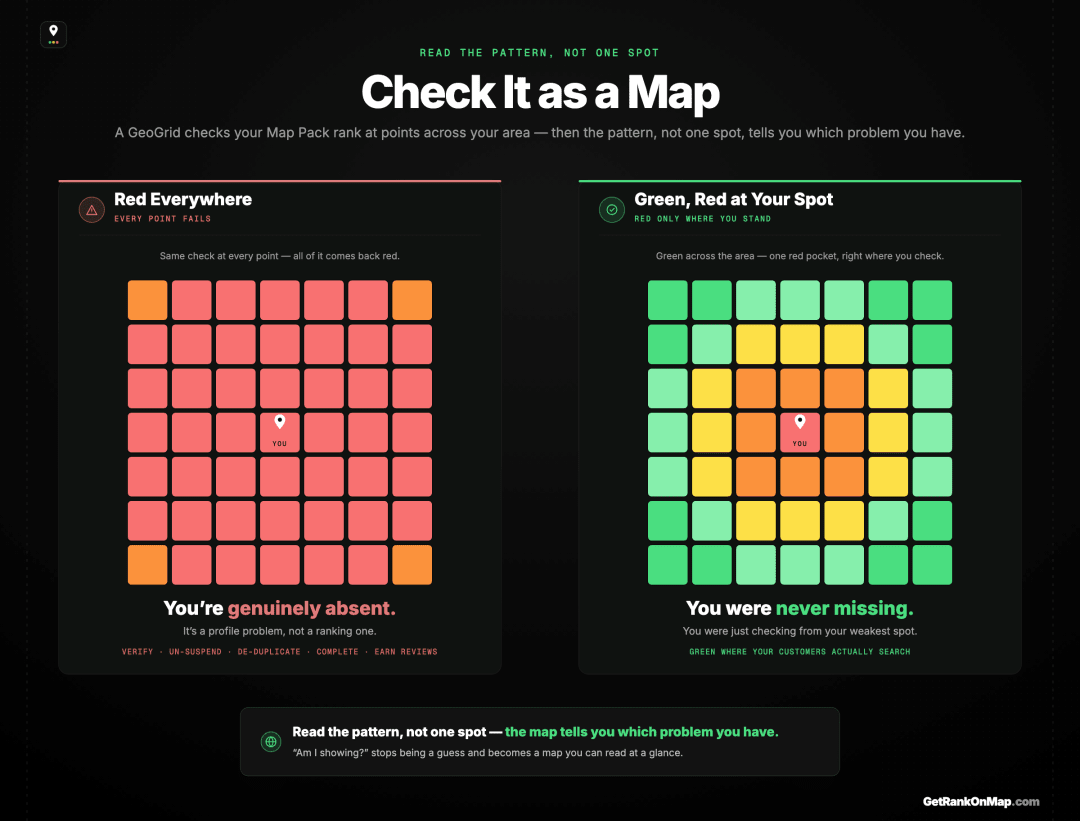
So how do you know whether you're genuinely missing or just missing from your chair? You stop checking from one place and start checking across the whole area at once.
The tool for that is a GeoGrid: a grid of points laid across your catchment, with your Map Pack rank checked at every point and the result drawn as a colour-coded heatmap — green where you're showing in the pack, red where you're not. Here's how a GeoGrid scan works. That map settles the question instantly. If the grid is red everywhere — you're genuinely absent, and it's a profile problem from the sections above: verify, un-suspend, de-duplicate, complete, earn reviews. If the grid is green in your customers' neighbourhoods and only red around your own location, you were never missing — you were looking from your weakest spot, and the business is being found exactly where it counts.
That's the difference between hours of needless profile-rebuilding and a calm, accurate read of where you actually stand. It turns "am I showing?" from a guess into a map.
That map is what RankMap is built to give you: your real Map Pack visibility across every neighbourhood you serve, so "not showing" stops being a panic and becomes a question you can actually answer. RankMap isn't live yet — we're pre-launch. If you want to check your visibility as a map instead of guessing from one spot, join the waitlist for free early access. (And if you just want the quickest way to check today, here's how to check your Maps ranking for free.)
Invisible Somewhere, Not Everywhere
"Why is my business not showing on Google Maps?" almost always has a real, fixable answer — but the first job is figuring out which problem you actually have. If you're genuinely absent, it's profile housekeeping: verify, resolve suspensions, clear duplicates, complete the listing, earn reviews — and then the honest question is how long any of that takes to show up, which nobody publishes a figure for. If you're showing to customers but not to yourself, nothing is broken — you're just searching from your weakest, most personalised vantage point, and the business is being found exactly where it should be.
The mistake is treating the second as the first. The way to avoid it is to stop checking from one spot and check across your whole area as a map — green where customers can find you, red where they can't. That's the calm, accurate read RankMap is built to give you. We're not live yet, but when we are, "not showing" becomes a question you can answer at a glance instead of a panic. Join the waitlist for free early access.
Frequently asked questions
- 01Why can't I find my own business on Google Maps?
- Most often because you're searching from your own location, signed into your own account, on a device with its own search history — and Google personalises results by all three. You're seeing your rank from one biased spot, not the neutral result a customer gets. If you can't find yourself, it usually means you're weak *at that location*, not that you've disappeared. The exceptions are genuine profile problems — an unverified, suspended, or duplicate listing — which keep you from showing to anyone. The only way to tell the two apart is to check your visibility across your whole area rather than from one place.
- 02My business isn't showing at all — is my profile suspended?
- It might be, but it isn't the only possibility. A profile that's unverified, brand new and thin, or a duplicate can also fail to show. Check your Google Business Profile dashboard for a suspension notice or verification prompt — those tell you directly. If the profile is verified and in good standing but you still can't find it, the issue is more likely ranking and location than a suspension, and checking across a grid of points will confirm whether you're genuinely absent or just absent from your own spot.
- 03Why does my business show for some people and not others?
- Because Google measures distance from each searcher, your ranking is recalculated for every location and naturally changes across your area. You'll usually show strongest near the business and fade further out, where a competitor becomes the closer, more convenient option for that searcher. So one customer finds you easily and another, a few miles away, doesn't — both are seeing accurate, personalised results. It's the distance factor working as designed, which is why your visibility has to be read as a map, not a single yes-or-no.
- 04How do I get my business to show on Google Maps?
- If you're genuinely not appearing, work through the profile basics first: verify the listing, resolve any suspension, remove duplicates, and complete every field accurately and consistently with your details elsewhere on the web. Then build prominence by earning genuine reviews and keeping the profile active. If you *are* showing to customers but not in your own searches, there's nothing to fix on the profile — you're simply ranking unevenly across your area, which is normal, and the task is to measure where you're weak rather than rebuild what isn't broken.
- 05Is searching incognito a reliable way to check my ranking?
- It's better than a normal search, but still not reliable. Incognito removes some of the personalisation from your account and search history, so you're less likely to see an artificially flattering result. But it does nothing about location — Google still ranks from wherever your device is — so you're still only seeing your rank from one spot. To check properly you need to measure many points across your area at once and read the result as a map, which is what a grid-based check does.
Explore with AI
Share this
Map your real rank across the city.
Free for the first 50 scans. No credit card.
Join the waitlist