My Google Maps Ranking Dropped — What Actually Happened
You were #4, now you're #10, and nothing changed on your profile. A drop in one number usually means you lost some streets, not all of them. How to tell which.

The Short Answer
You probably didn't drop everywhere.
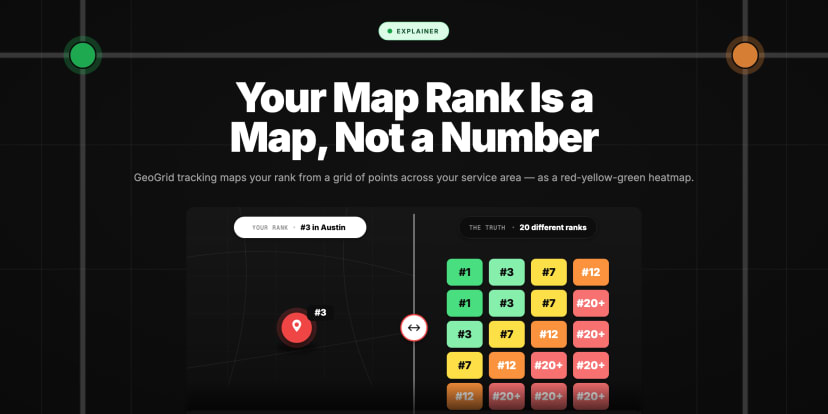
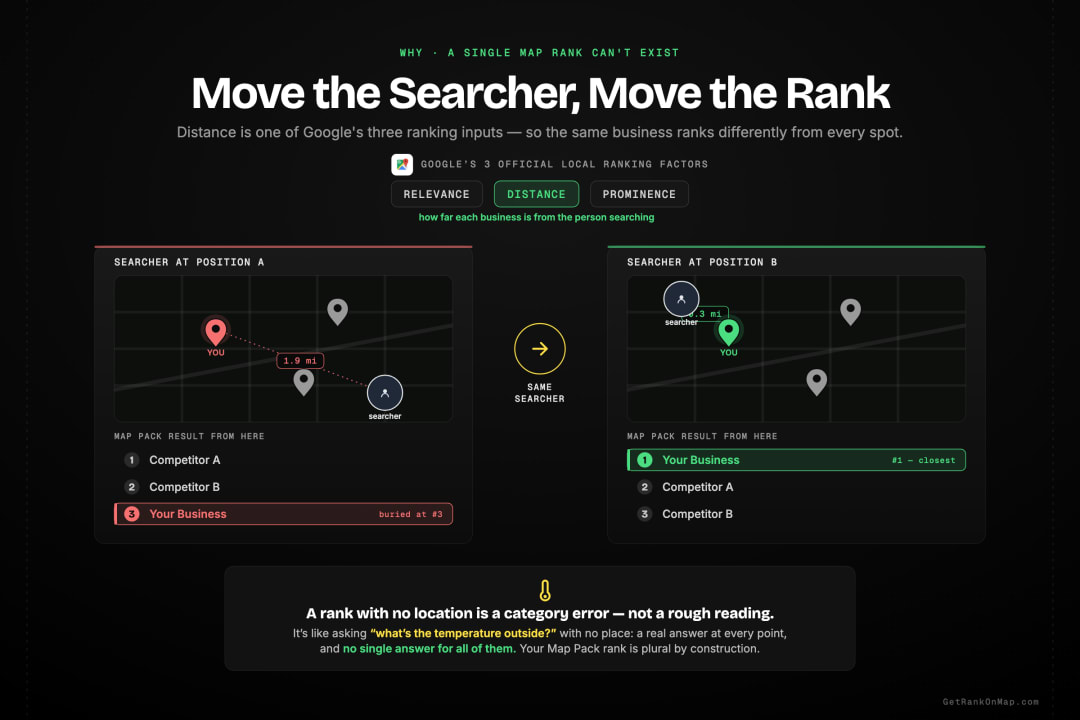
A rank number comes from one spot on the map. Move a few streets and the answer changes — that is how Maps works, not a glitch. So when your number falls from #4 to #10, the honest reading is usually that you lost ground in some patches and held it in others, and the one point you happen to be measuring from landed in a patch you lost.
That matters, because the two cases need opposite responses. Losing a few streets at the edge of your area is normal drift, and chasing it wastes a month. Losing the blocks around your own front door is a real problem, and it is the one worth acting on today.
The rest of this page is about why the single number could never have told you which of those happened.
If You Moved, You Didn't Drop — You Relocated
Distance is measured from the searcher to you. Change your address and every point on the map recalculates at once: the area around the old place fades over the following weeks, the area around the new one builds. Nothing was penalised, and there is nothing to fix.
What throws people is the timing. The two halves do not happen together — the old area usually fades before the new one fills in, so for a stretch you look worse everywhere at once. Measured as one number, that reads as a collapse. Measured as a map, it reads as exactly what it is.
What a Drop Usually Means
- A single Google Maps rank number is a measurement taken from one spot at one moment — and your real position changes from block to block, so that one number describes a fraction of the truth and hides the rest
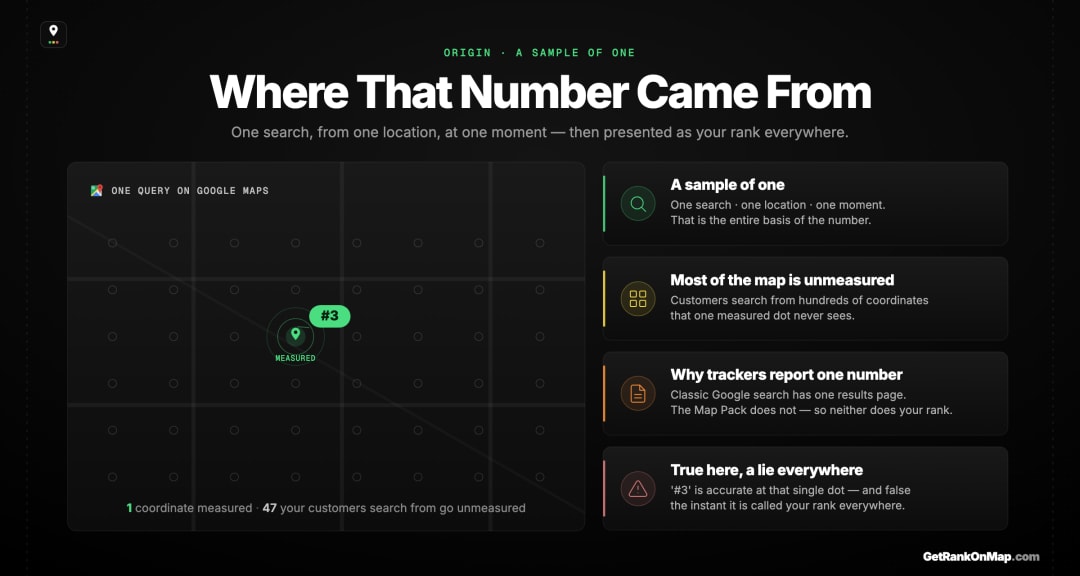
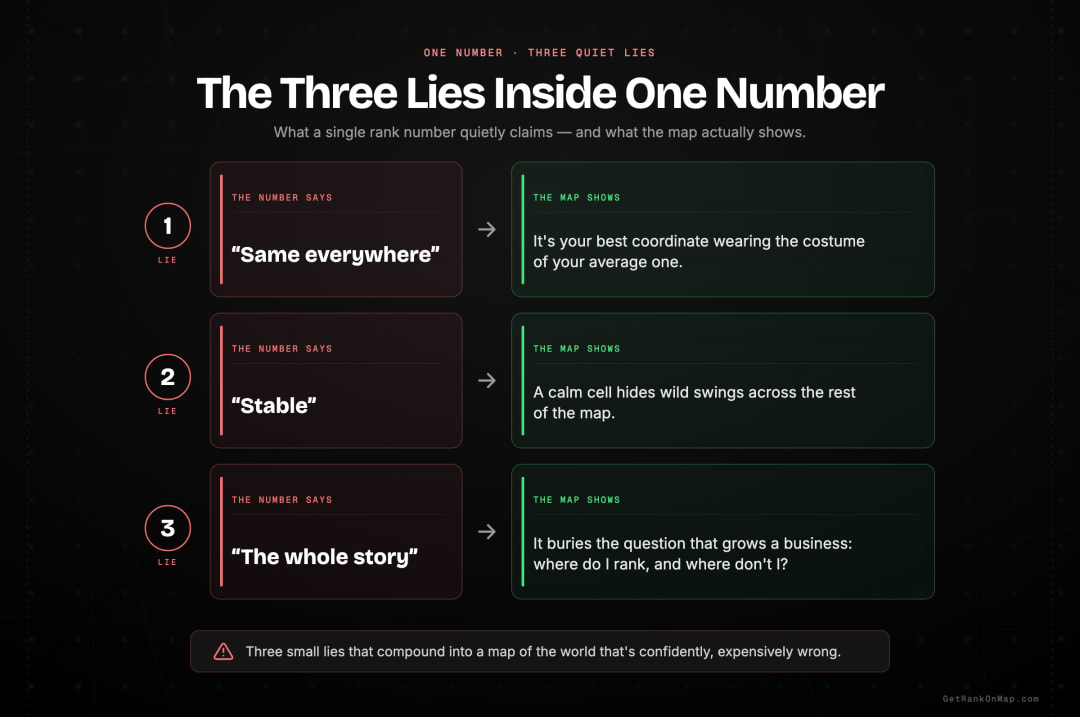
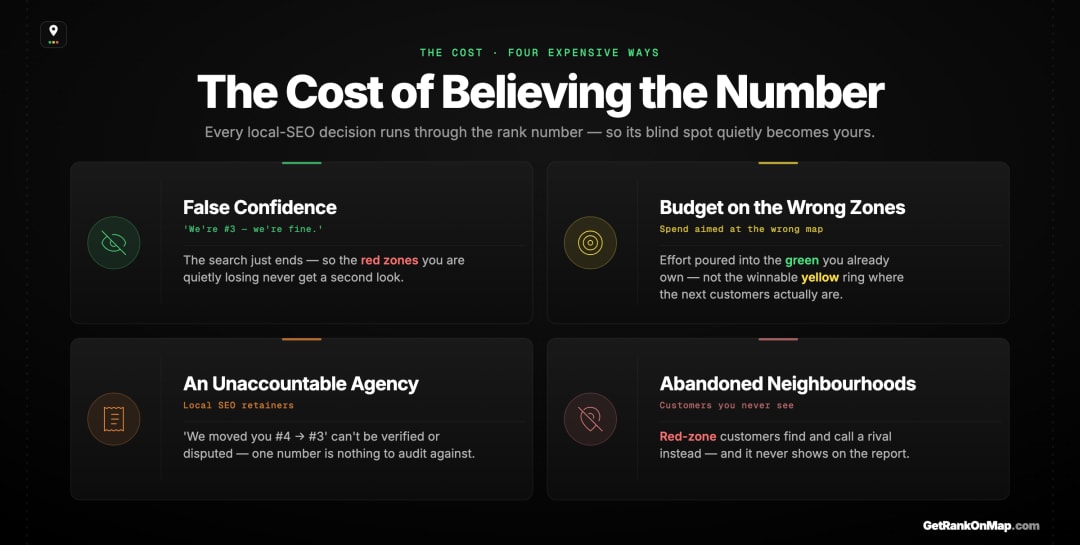
It isn't a tracking error you can fix with a better tool set the same way — it's **structural**: distance from the searcher is one of Google's three official ranking factors, so a location-dependent result *cannot* collapse into one honest number * The number tells you three quiet lies: that your rank is **[the same everywhere](/blog/no-business-ranks-1-everywhere)**, that it's **stable**, and that it's **the whole story** — none of which is true for a local business * Believing it costs real money: **false confidence** in neighbourhoods you're actually losing, **budget aimed at the wrong areas**, and an agency you literally cannot hold accountable with a number that drifts from #4 to #3 * Most local businesses aren't even tracking this at all — [the majority don't track their Map Pack visibility](https://getrankonmap.com/blog/map-pack-tracking-gap) — so the few who watch a single number at least know it's worth watching; they're just watching the wrong thing * The honest answer isn't a better number, it's a different shape entirely: **a heatmap of where you rank across your whole service area** — green where you win, red where you vanish "Where do you rank on Google Maps?" is the most natural question a local business can ask, and the single number you get back — "we're third" — is the most comforting answer in local SEO. It's also a lie. Not a malicious one, and not a tracking glitch you can patch. It's a lie baked into the shape of the answer itself: one number, for a thing that doesn't have one. This piece is about why that number deceives you even when it's technically correct, what it quietly costs you every month you trust it, and what the honest version of the answer actually looks like. If you've ever reported a Map Pack rank to a client, a boss, or yourself and felt good about it, this is the thirty seconds that should make you uneasy — in a useful way. ## "We're #3" — The Most Comfortable Lie in Local SEO > Every local business has a number it quotes. "We're third for our main keyword." It gets said in meetings, written in reports, used to justify budgets and to sleep at night. The number feels like a fact because it's specific and it doesn't move much. But specificity isn't accuracy, and a number that feels solid is exactly the kind of lie that's hardest to catch. Ask a local business owner how their Google Maps visibility is doing and you'll almost always get a single, confident number. "We're #3 for plumber near me." "We've been holding #2 for months." It sounds like a vital sign — a clean, trackable fact about the health of the business. That confidence is the problem. A single number is easy to believe *because* it's simple: one figure, easy to remember, easy to report, reassuringly stable week to week. It has all the texture of a fact. But "we're #3" is answering a question — *where do we rank?* — as if it had one answer, when the honest reply is a question of its own: **third where?** Third from your front desk, where you happened to check? Third from the neighbourhood across town where a third of your customers actually live? Those are different numbers, and only one of them got reported. The comfort is the trap. A vague worry ("I'm not sure how we're really doing") at least keeps you looking. A confident wrong number stops you looking altogether. ## Where That Number Actually Came From
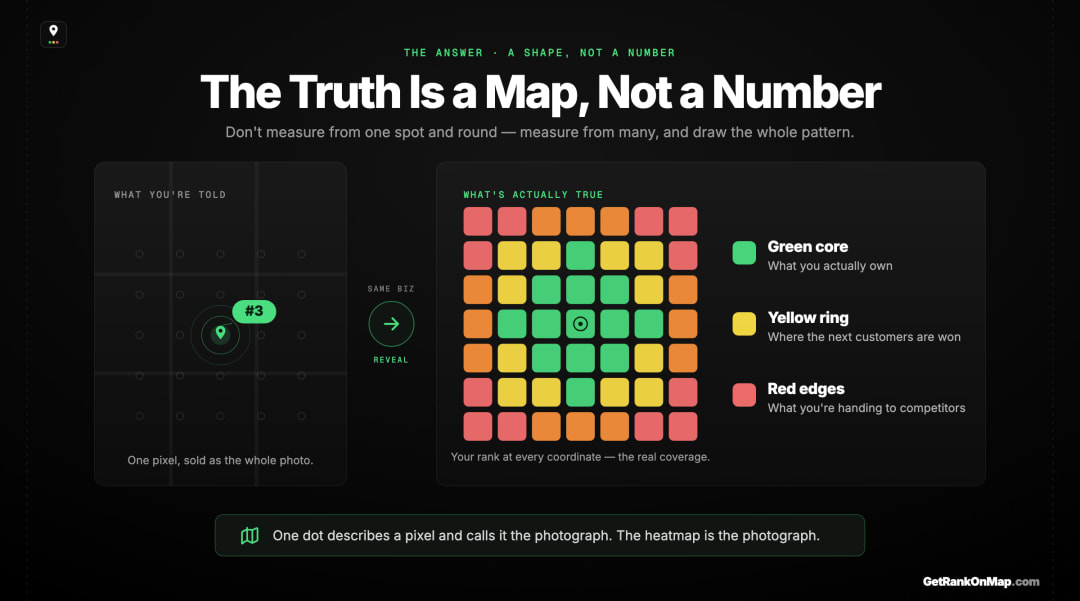
That's exactly what a GeoGrid heatmap is: a grid of points laid across your service area, your keyword run from each one, and your rank at every point coloured in — green where you're in the top three, yellow where you're mid-pack, red where you've vanished. The output isn't a figure you report; it's a picture you read. The green core shows what you actually own. The red edges show what you're handing to competitors. The yellow ring shows where the next customers are won. (Here's the full how-it-works on GeoGrid tracking if you want the mechanics.)
A single number describes one pixel of that image and presents it as the photograph. The heatmap is the photograph. Once you've seen your visibility as a map, "we're #3" stops sounding like a fact and starts sounding like what it always was — one dot, picked from your best angle.
That's the entire reason RankMap exists: to replace the comforting single number with the honest map. Set your keyword, drop a grid over your service area, and see your real Map Pack coverage — your colours and your competitors' side by side — instead of one figure that flatters you while you lose the neighbourhoods you can't see.
RankMap isn't live yet — we're pre-launch. If you're done trusting a number that's structurally incapable of telling you the truth, join the waitlist for early access. You'll be first in line the day the map is ready — and you'll never quote a single rank number with a straight face again.
You Lost Streets, Not the Map
How often you check matters as much as what you check — see daily vs periodic map rank tracking.
If it looks like you have vanished, read why your business may not be showing on Google Maps.
A single Google Maps rank number isn't a lie because someone faked it. It's a lie because of its shape — one figure standing in for something that has a different value at every point your customers search from. Google ranks local results partly by how close each business is to the searcher, so your rank is plural by design. Collapse it into one number and you haven't measured your visibility; you've taken a flattering selfie of your best block.
And the cost isn't abstract. The false confidence, the misaimed budget, the agency you can't hold accountable, the neighbourhoods you're losing without knowing — all of it flows from trusting a metric that's structurally incapable of showing you where you're weak.
The fix isn't a better number. It's a different shape of answer: a map. Once you've seen your real coverage as a heatmap — green core, red edges, contested yellow in between — you can't unsee it, and you won't want to go back to one dot. That's what RankMap is built to show you. We're not live yet, but when we are, you'll finally see your business the way your customers' searches already do. Join the waitlist to be first in line.
Frequently asked questions
- 01Why does my Google Maps rank change depending on location?
- Because distance from the searcher is one of the three factors Google uses to rank local results, alongside relevance and prominence. Google weighs how close each business is to the person searching, so the same keyword returns a different Map Pack from different locations. Your rank isn't a fixed property of your business — it's a value that genuinely differs at every point on the map, which is why a single rank number can never describe it fully.
- 02Is a single Google Maps rank number ever accurate?
- It's accurate about one thing: your position at the exact spot and moment the search ran. From that one coordinate you really were, say, #3. It becomes a lie only when it's presented as your rank everywhere — because your position changes block by block across your service area. The number isn't false; it's just one sample being passed off as the whole picture.
- 03If I only have one location, does the single number still lie?
- Less, but still somewhat. If nearly all your customers come from the immediate few blocks around you, a single check is close to honest — though even then your rank varies across those blocks. The single number deceives most when your customers are spread across an area: service-area businesses, multi-location brands, and anyone in a dense market where competitors sit within a mile and rankings shift street by street.
- 04Can't I just check my rank from a few different spots myself?
- You can, and it's better than one check — but doing it by hand is slow, easy to bias toward the spots where you look good, and impossible to repeat consistently over time. The point of a GeoGrid is to do this systematically: dozens of points on a fixed grid, the same every scan, so you can actually see your coverage and track whether it's improving rather than collecting a handful of scattered, unrepeatable readings.
- 05What should I track instead of a single rank number?
- Track your *coverage* — your rank across a grid of points spanning your whole service area, drawn as a colour-coded heatmap. Instead of "what's my rank?" you answer "where do I rank well, where am I invisible, and where are the winnable neighbourhoods?" That's the metric that maps to real customers and real revenue, because it shows you the areas you're losing — which a single number structurally cannot.
- 06What is GeoGrid rank tracking?
- GeoGrid rank tracking measures your Google Maps position from a grid of points spread across your service area rather than from a single location, then plots the results as a heatmap — green for top-three, yellow for mid-pack, red for not ranking. It's the honest answer to "where do you rank on Google Maps?", because it captures the geographic variance that a single rank number averages away. There's a full plain-English explainer linked throughout this piece.
Explore with AI
Share this
Map your real rank across the city.
Free for the first 50 scans. No credit card.
Join the waitlist